Pixel Sprite FX - 24 Pixel Outline, Dissolve & Hit Flash Shaders for Godot 4
50% off until Oct 16.
Try it in your browser: press Run asset pack on this page
Free Lite: https://inkharbor.itch.io/pixel-sprite-fx-lite
Also in the bundle (13 tools, $54.56, Oct 12 to Oct 16): https://itch.io/s/204018/godot-juice-and-polish-bundle
See it running in Last Ember, a free browser game: https://inkharbor.itch.io/last-ember
Try it in your browser above before you buy.
Godot version: Works with Godot 4.4+. Tested on 4.4 and 4.7 (Windows, NVIDIA GPU, Compatibility and Forward+ on 4.7). Does not run on 4.3 (two shaders use the 4.4 hint_enum uniform hint). Not tested: Mobile renderer, web export.
Pixel Sprite FX gives your Godot 4 sprites 24 shaders: pixel outline, dissolve and hit flash, with presets for fast setup.
Pixel Sprite FX is a set of 24 shaders made for pixel-art sprites in Godot 4.7. Each comes with three ready-made presets, so there are 72 materials you can drop onto a Sprite2D, AnimatedSprite2D or TextureRect right away.
Most shader packs assume smooth graphics. On pixel art, a blur, a soft glow or a rotated sample breaks the look. Everything here works on the texel grid instead: sampling snaps to whole texels, colours change in hard steps, glows are rings of whole pixels, and fades are dither patterns. The sprite still looks like pixel art with the effect on.
What is in it
Colour (6):
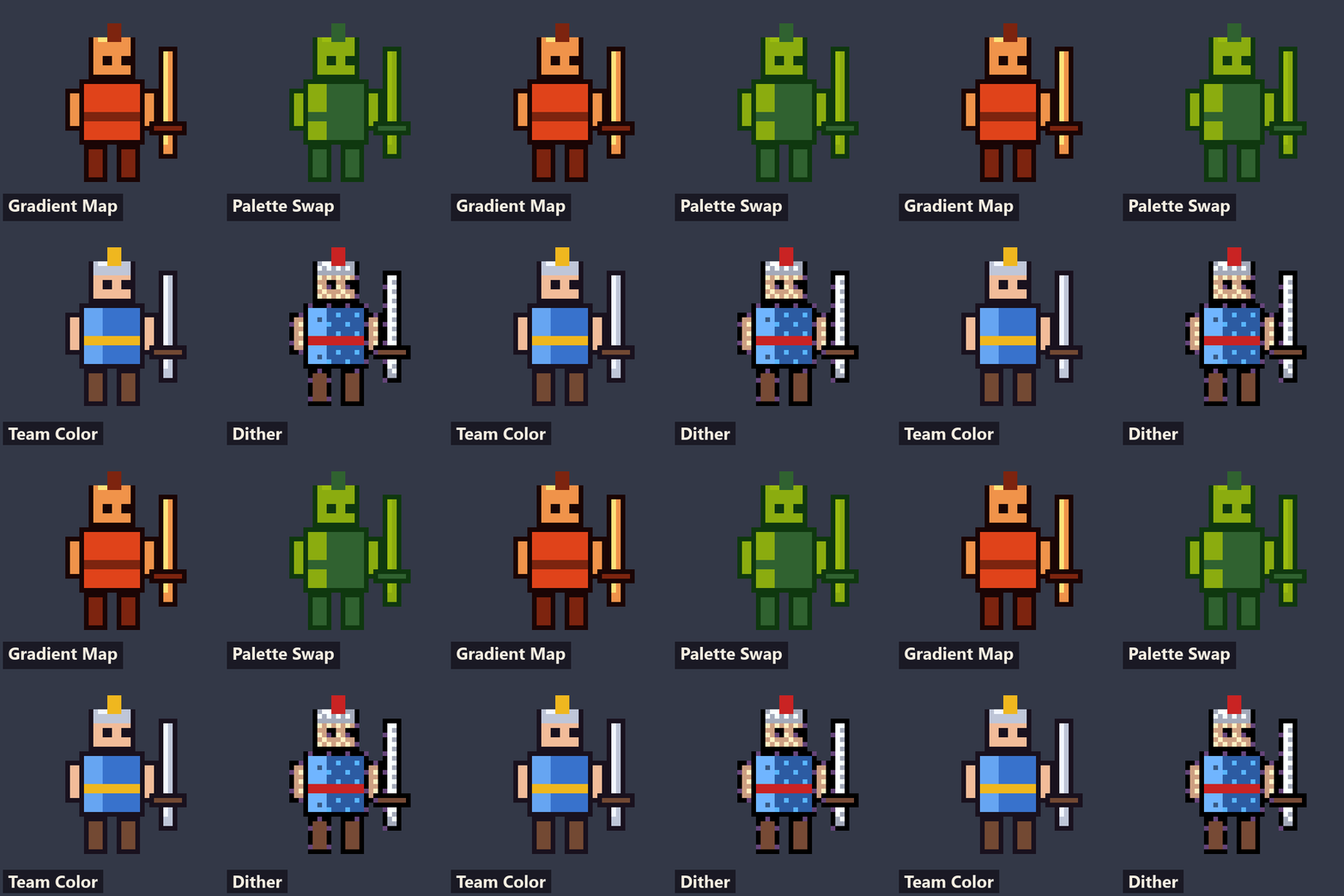
- Palette Swap (remap onto a 4 or 5 colour ramp, with crisp hard steps)
- Team Color (swap one hue, keep the shading)
- Grayscale Tint (stone, ghost, sepia)
- Gradient Map
- Hue Shift Pixel (with optional posterize)
- Posterize Dither (ordered Bayer dither on the texel grid)
Edges (5):
- Pixel Outline (1 or 2 texels, outside or inside the silhouette)
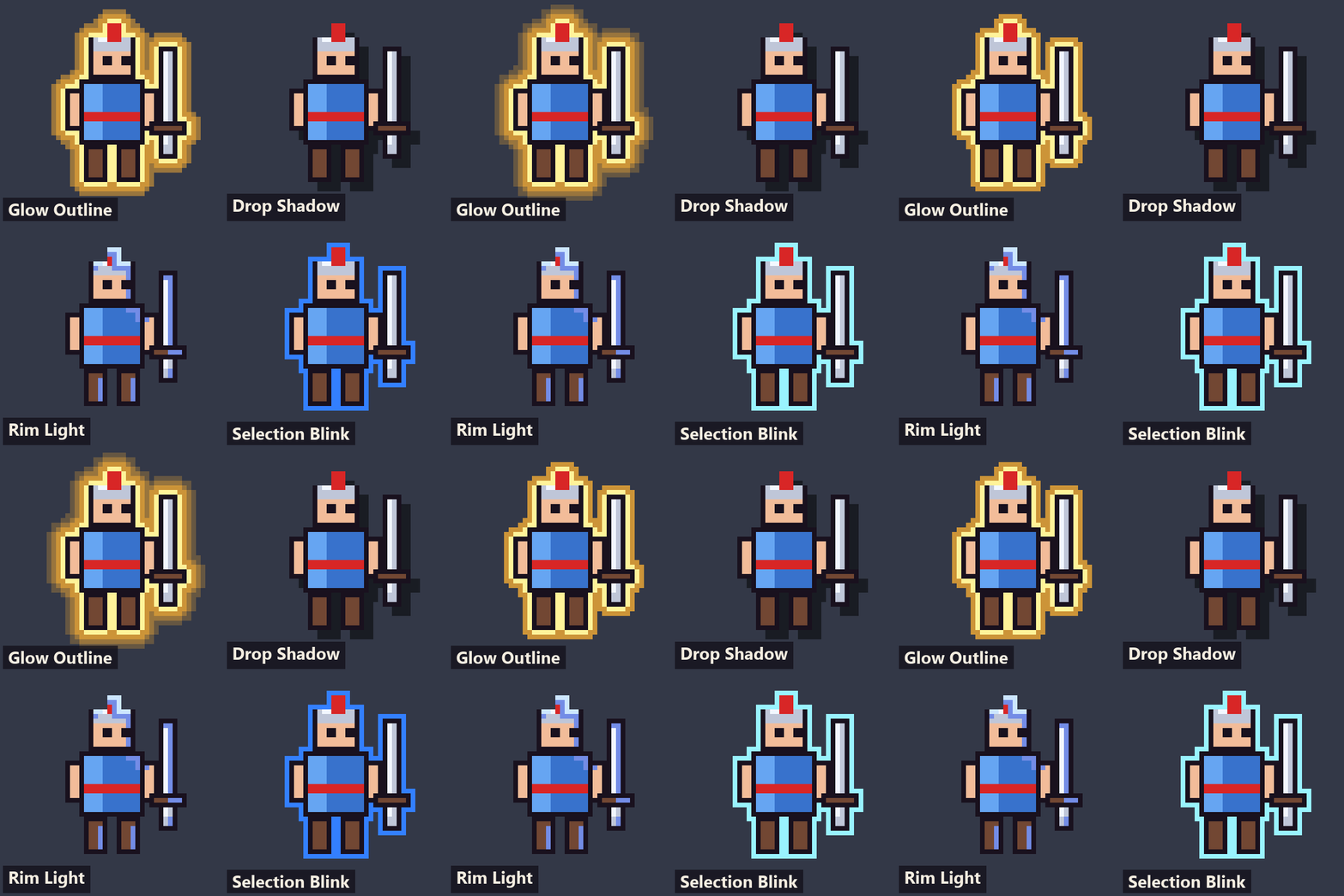
- Pixel Shadow (hard drop shadow or long cast shadow, optionally dithered)
- Outline Glow Pixel (outline plus a glow made of whole-pixel rings)
- Rim Light Pixel (flat-colour rim light, can spin around the sprite)
- Selection Blink (hard on/off highlight for selected or hovered units)
Hit and status (5):
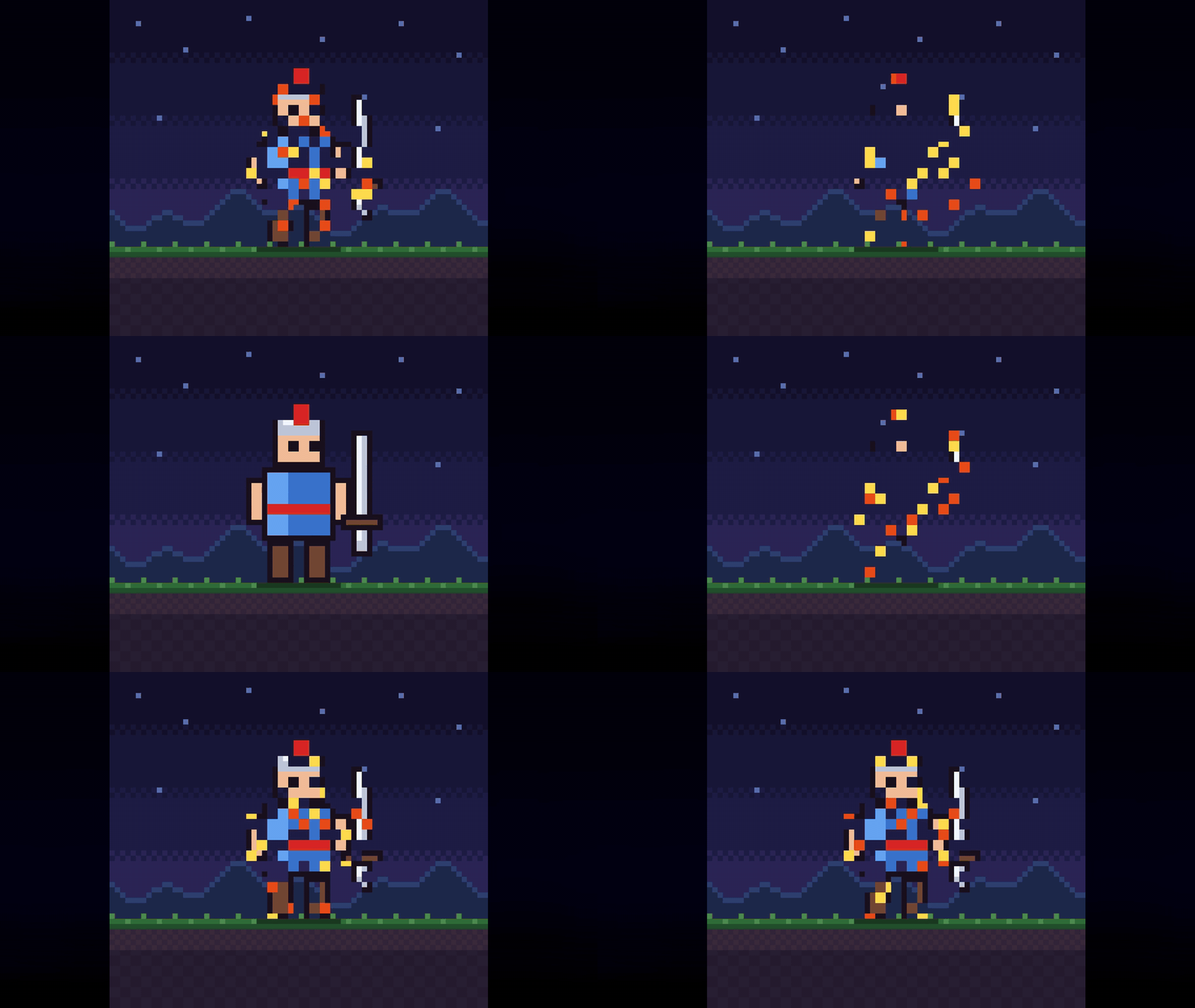
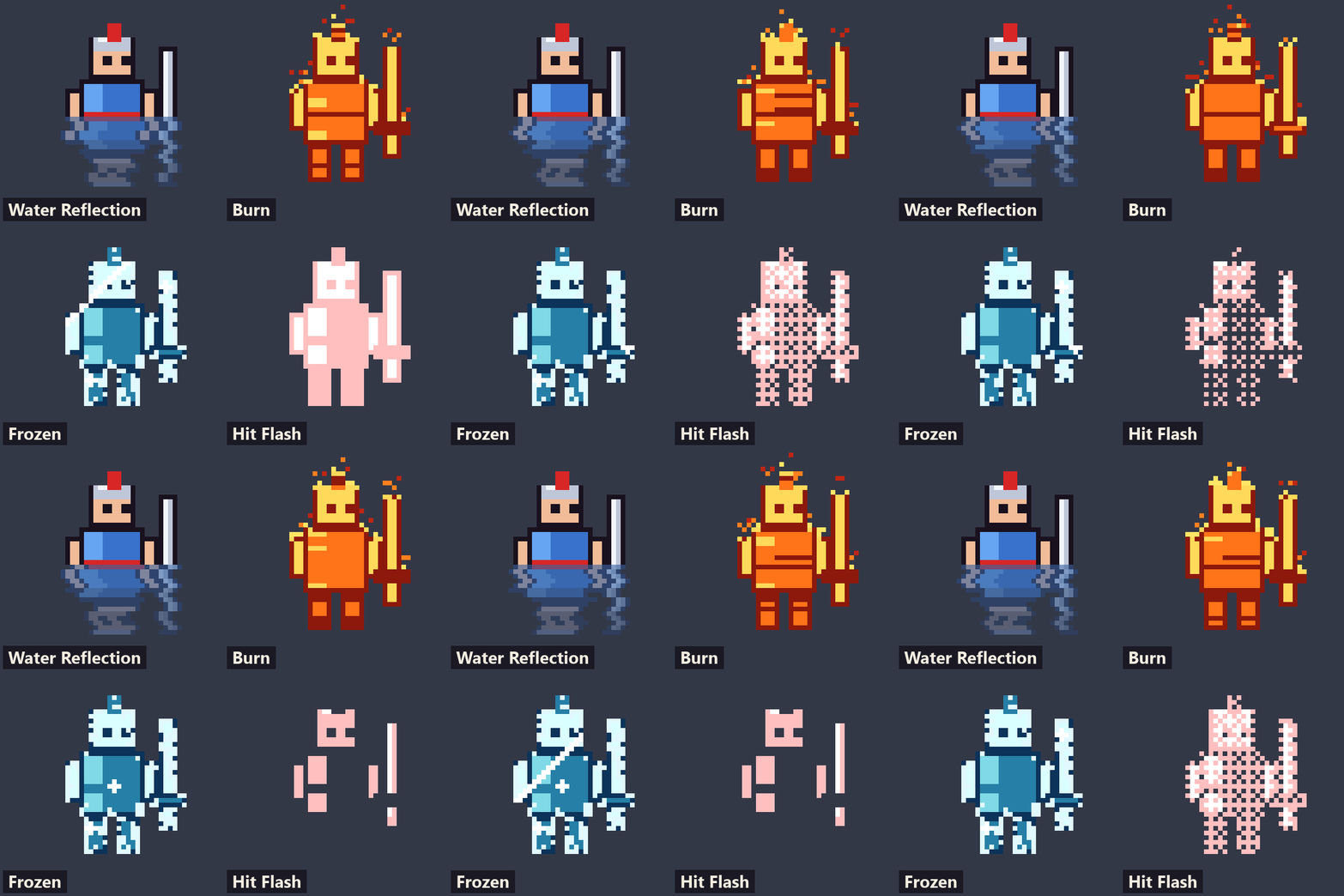
- Burn Status (fire palette, flickering dither, rising embers)
- Poison Tint (green palette, pulsing in hard steps, pixel bubbles)
- Frozen Status (ice palette, frost crust, glint sweep, sparkles)
- Hit Flash Pixel (decays in 2 to 4 hard steps through a dither)
- Damage Blink (invincibility frames: vanish, tint or checker)
Motion (8):
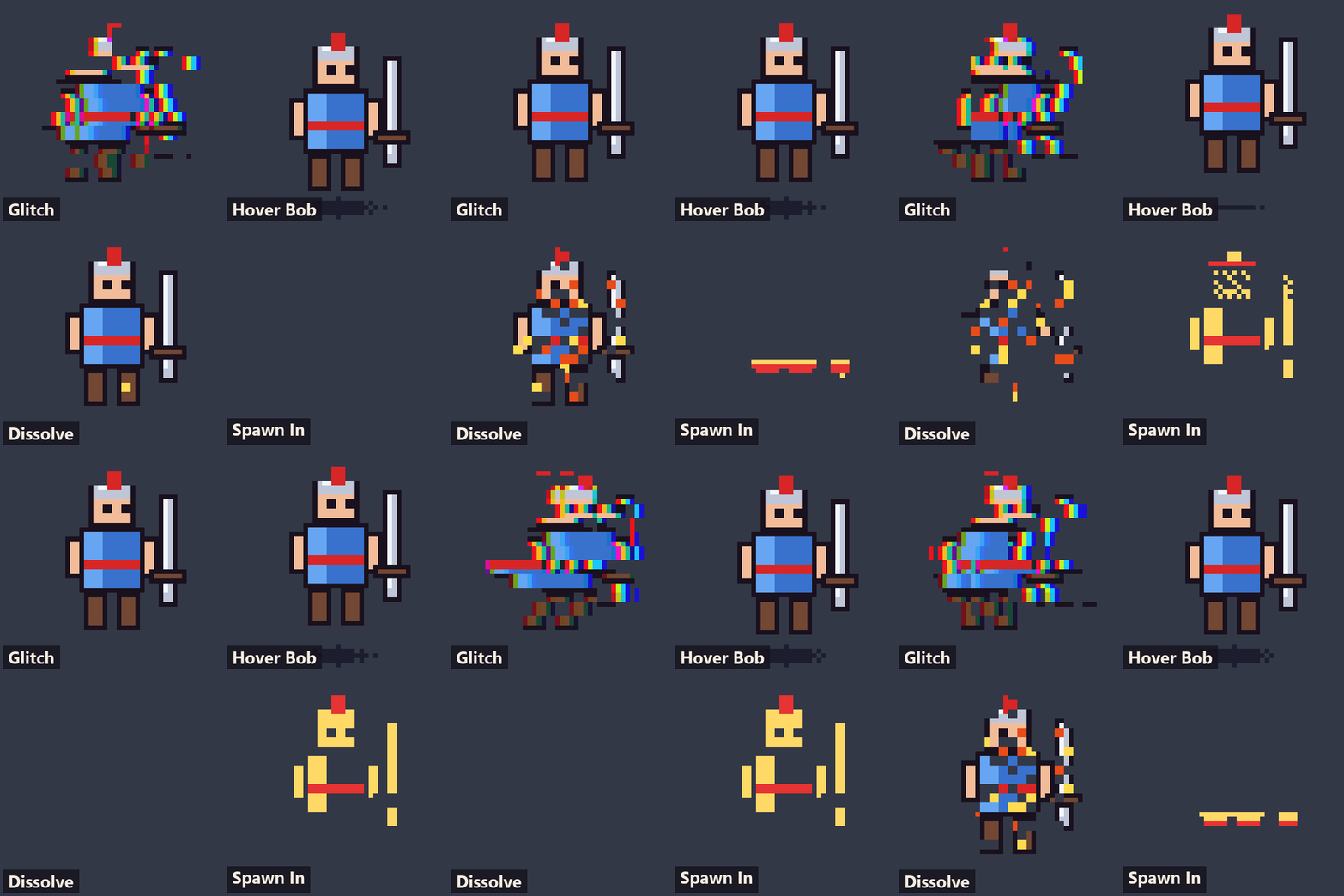
- Pixel Dissolve (blocky noise with a flat two-band edge)
- Pixel Dissolve Dir (directional wipe with a dithered edge)
- Spawn In (build-up reveal for summons and teleports)
- Water Reflect (mirrored sprite with stepped ripple rows)
- Wind Sway (grass and trees, whole-texel bend)
- Glitch Pixel (row and block displacement, RGB split)
- Shake Pixel (whole-texel jitter that settles)
- Hover Bob (whole-texel bob with a ground shadow that shrinks)
How it works
Select a sprite, open CanvasItem > Material, and load a .tres preset from addons/pixel_sprite_fx/presets. Change colours and numbers in the Inspector. There are no scripts to set up.
For a team colour, team_color looks for red markings by default. Point its key_color uniform at another colour from your art to key on that instead.
Seven shaders are meant to be fired from code through a progress value from 0 to 1: Hit Flash, Pixel Dissolve, Pixel Dissolve Dir, Spawn In, Shake, and optionally Damage Blink and Grayscale Tint. A Tween does it:
var mat := $Sprite2D.material as ShaderMaterial
mat.set_shader_parameter("progress", 0.0)   # full flash
create_tween().tween_property(mat, "shader_parameter/progress", 1.0, 0.25)
Burn, Poison and Frozen are loops with a strength value from 0 to 1. Set it when the status starts and ends.
What you get
- 24 shaders (.gdshader), each with a usage header and Inspector sliders
- 72 presets (.tres), three per shader
- A demo scene,
demo/showcase.tscn, that shows every preset running live on a pixel-art sprite - README with install steps, a padding table and a table of all shaders
- Licence for commercial use in your own games and apps
Requirements and honest notes
- Godot 4.7. Copy the
addons/pixel_sprite_fxfolder into your project. No plugin to enable. - Sprites must use the Nearest texture filter (Project Settings > Rendering > Textures > Default Texture Filter, or per node). With a smooth filter the pixels blur before the shader sees them.
- All 24 shaders and all presets (72 of 72) rendered with no errors in both Forward+ (Vulkan) and Compatibility (OpenGL 3.3) on an RTX 2060 with Godot 4.7, with Nearest filtering. They are not tested in a web (HTML5) export, so check that if you ship to the browser.
- Some effects add pixels outside the sprite, so the image needs transparent padding around the art: Pixel Outline, Pixel Shadow, Outline Glow Pixel, Selection Blink (unless set to draw inside), Burn Status embers, Shake Pixel, Wind Sway, Glitch Pixel and Hover Bob. The README has a table with how much each one needs.
- Water Reflect needs transparent rows under the feet and its
baselineset per sprite. - Palette Swap maps by brightness. Use Team Color when you need to swap by hue.
- Outline Glow Pixel reads many texels per pixel. It is fine for small sprites, so check it before using it on large textures.
- One node holds one material. To combine effects, put them on separate nodes.
- These are shaders, not a particle system. They edit the sprite's own pixels and do not read what is behind it.
Price
$7, or $3.50 until Oct 16 (50% off).
AI disclosure
The shader code, text, demo and preview images were produced with AI assistance (Claude) and directed by a human. The effects are all procedural, no third-party shaders or assets were used, and the demo sprite is generated in code.
Works great with: Pulse FX 2D and Weather FX 2D. See also the Godot Juice and Polish Bundle.
More from inkharbor
Full packs: Print & Paint FX · Retro Screen FX · Pulse FX 2D · Weather FX 2D · Toon Forge 3D · Ember VFX 3D · Hitfeel Kit · Screen Transitions · Settings Menu Kit · Save/Load Kit · Inventory Kit · Dialogue & Quest Kit · Exporter Pro
Free to try: Print & Paint sampler · Exporter (free) · Hitfeel Lite · Screen Transitions Lite · Retro Lite · Pulse Lite · Weather Lite · Pixel Lite · Toon Lite · Ember Lite · Dialogue Lite · Inventory Lite · Last Ember (free game)
Purchase
In order to download this asset pack you must purchase it at or above the minimum price of $3.50 USD. You will get access to the following files:
Leave a comment
Log in with itch.io to leave a comment.